

Background
WeChat’s latest iOS version (8.0.70+) introduced the ClawBot plugin. Under the hood, it uses a protocol called iLink, hosted at ilinkai.weixin.qq.com. This is an official Tencent product, backed by the “WeChat ClawBot Terms of Service” — not a gray area.
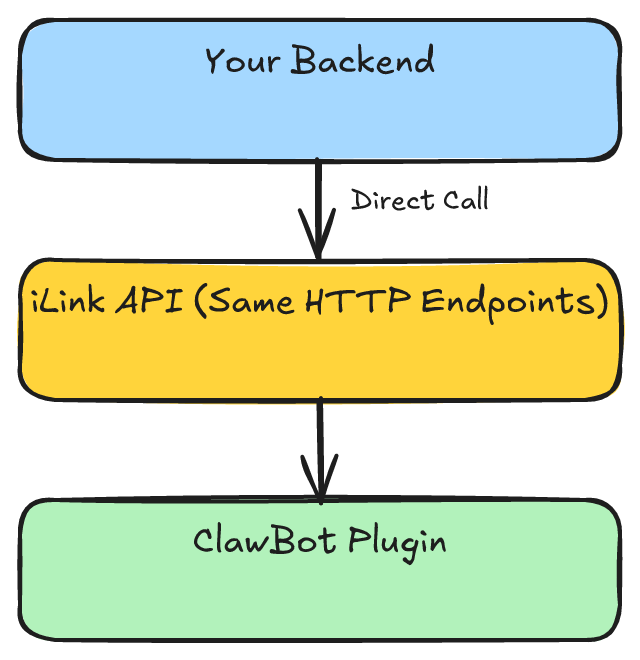
The intended use case is connecting OpenClaw agents to WeChat. But the iLink protocol itself is a generic HTTP/JSON Bot API with no coupling to the OpenClaw framework — any program that can send HTTP requests can interface with it.
Protocol Overview

The entire protocol consists of just 4 HTTP endpoints.
1. Registration — QR Code Binding
GET /ilink/bot/get_bot_qrcode?bot_type=3Response:
{
  "qrcode": "xxx",
  "qrcode_img_content": "https://liteapp.weixin.qq.com/q/..."
}qrcode: QR identifier, used to poll for scan statusqrcode_img_content: QR code image URL, renderable in terminal or browser
After the user scans, poll for status:
GET /ilink/bot/get_qrcode_status?qrcode=xxx
Header: iLink-App-ClientVersion: 1
Status transitions: wait → scaned → confirmed
Upon confirmation, you receive the key credentials:
{
  "status": "confirmed",
  "bot_token": "44b9b8ec@im.bot:060000b7...",
  "ilink_bot_id": "44b9b8ec@im.bot",
  "ilink_user_id": "o9cq809L...@im.wechat",
  "baseurl": "https://ilinkai.weixin.qq.com"
}
bot_token is the auth credential for all subsequent API calls. Scan once, valid long-term.
2. Receiving Messages — HTTP Long Polling
POST /ilink/bot/getupdates
Authorization: Bearer <bot_token>
Headers:
  AuthorizationType: ilink_bot_token
  X-WECHAT-UIN: <random base64>

Body:
{
  "get_updates_buf": "",
  "base_info": { "channel_version": "0.1.0" }
}
Response:
{
  "ret": 0,
  "msgs": [
    {
      "from_user_id": "o9cq809L...@im.wechat",
      "message_type": 1,
      "item_list": [
        {
          "type": 1,
          "text_item": { "text": "Hello" }
        }
      ],
      "context_token": "CK3E..."
    }
  ],
  "get_updates_buf": "Ck1..."
}
Key mechanisms:
- Long polling: Server holds the connection for ~30s, returns immediately when a message arrives, returns empty on timeout
get_updates_buf: Sync cursor, similar to Telegram’s offset — include the previous response’s value in each requestcontext_token: Unique per message, must be included when replying to maintain conversation context
3. Sending Messages — Replying to Users
POST /ilink/bot/sendmessage
Authorization: Bearer <bot_token>

Body:
{
  "msg": {
    "to_user_id": "o9cq809L...@im.wechat",
    "client_id": "unique-id-123",
    "message_type": 2,
    "message_state": 2,
    "item_list": [
      { "type": 1, "text_item": { "text": "Hello! I'm Claude." } }
    ],
    "context_token": "CK3E..."
  }
}client_id: Client-generated deduplication IDmessage_type: 2: Identifies as a Bot messagemessage_state: 2: Identifies as complete (non-streaming)context_token: Must come from the received user message
4. Message Type Constants
| Field | Value | Meaning |
|---|---|---|
message_type | 1 | User message |
message_type | 2 | Bot message |
message_state | 2 | Complete |
item.type | 1 | Text (text_item.text) |
item.type | 3 | Voice (voice_item.text is the transcription) |
Minimal Implementation for Any Backend
All you need is a simple loop:
1. Scan QR to get bot_token (one-time)
2. loop:
     msgs = POST getupdates(get_updates_buf)
     for msg in msgs:
       text = msg.item_list[0].text_item.text
       reply = your_backend_process(text)
       POST sendmessage(to=msg.from_user_id, text=reply, context_token=msg.context_token)
     get_updates_buf = msgs.get_updates_buf
Relationship with OpenClaw
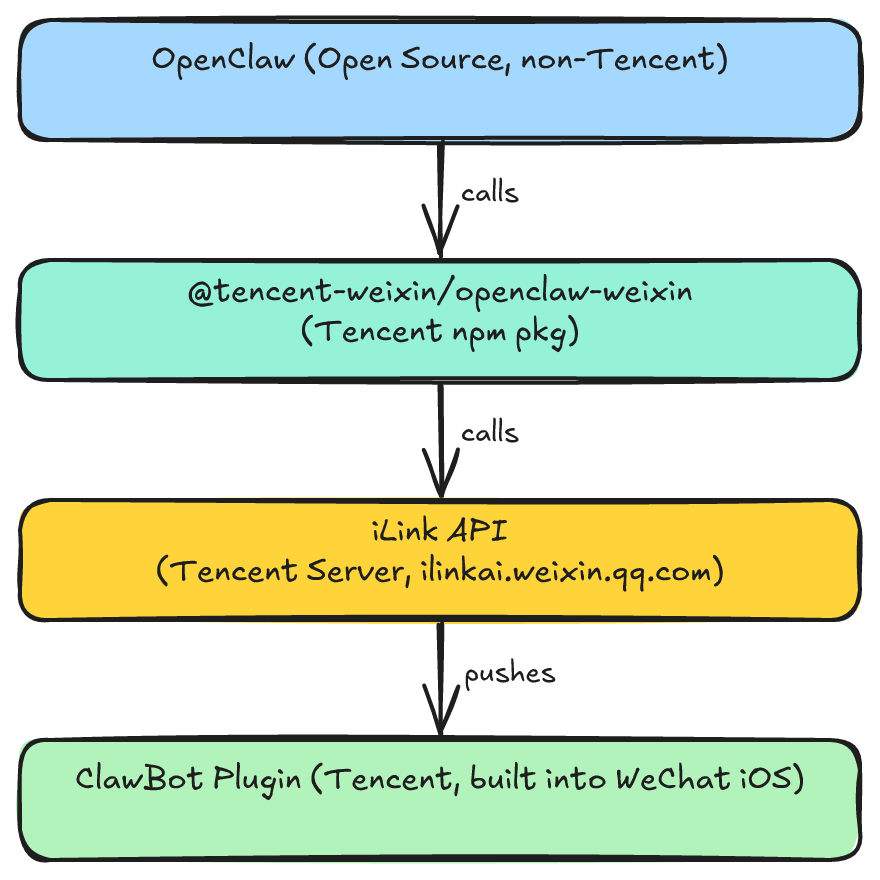
OpenClaw is an open-source AI agent framework initiated by Austrian developer Peter Steinberger (first released November 2025, 247k GitHub stars as of March 2026). Its core capability is giving LLMs local OS access. OpenClaw itself is not a Tencent product.
What Tencent did: opened a WeChat Bot channel for OpenClaw. Specifically:
- ClawBot Plugin: Developed by Tencent, built into iOS WeChat, enabled via “Me > Settings > Plugins”
- iLink Protocol: Bot communication protocol designed by Tencent, server at
ilinkai.weixin.qq.com @tencent-weixin/openclaw-weixin: Tencent’s npm package wrapping iLink for the OpenClaw framework
The relationship chain:
But iLink API is standard HTTP/JSON — no dependency on the OpenClaw framework or Tencent’s npm package:
Limitations
- ClawBot only supported on iOS WeChat 8.0.70+
- Each ClawBot binds to one WeChat user, connecting only one agent instance
- Currently text-only (no images or files)
- The meaning of
bot_type=3is undocumented; other types may exist - Token expiration unknown (observed to be long-lived)
- The feature is still in gradual rollout — not all users can enable it
Protocol References
- Protocol reverse engineering: Johnixr/claude-code-wechat-channel
- claude-to-im WeChat adapter: PR #20
- Tencent’s official npm package: @tencent-weixin/openclaw-weixin
- WeChat ClawBot Terms of Service